New : Download Free:Ebook | FREE : [ Limited Copies ] Premium Blogger Template : Grab Now!!! | Like Us :

Sunday, 2 June 2013

Top 5 ways to Buy a Bike/Car in College Life


Every one in the college life wants to have a bike,So that they can enjoy his college life with our friends.

But many parents do not give bikes to College students. Most of us have only desire to purchase our dream Bike after FIRST Job.

But they are many ways by which you can not only Purchase your own Bike but you too purchase your own Sedan CAR.


To Purchase a bike you have to learn the Top 5 mantras to earn money.
And you should earn in DOLLARS not in Rupees.


Top 5 ways to earn dollars:-

1)Blogging:-
There is no limit in Blogging you can earn upto million dollars in blogging you need to just post the quality articles. In blogging most of the revenue comes from Google adsense. Google pays $.2 to $1 per click
In Blogging Patience is required. It may take around 3 to 4 months to make your blog fruitful for earning. Blogspot is the free Blogging platform.You can make your account by visiting BLOGGER.COM

2.E-tutions and Webseminars:-
Demand of Online tutors is increasing day by day.If you you are good in academic you can earn on per hour basis.There are may website like TutorVista, e-tutor, SmartThinking and Tutor.com where you can enroll and earn money by Giving e-tutions.

3.Buying/Selling domains
Buying/Selling domains is one of the easiest way to earn money. You just need to earn some Good domain name from the website like GODADDY.com or BigRock.in for just about Rs 500 and you can Sell that domain on the websites like sedo.co.uk, afternic.com, ebay.com where people will auction on your Domain name and may pay you a hefty money for that domain.
You can easily earn $1000 per domain by this manner.

4.Freelancing Jobs:-
You can become a free lancer and take online projects and you will be paid for completing this projects.There are website like Freelancer.com where you can make account and  bid on various projects.

5.Selling photos:-
If you are a good in taking good snaps with your Smart phone or camera. Then you can take advantage of this quality to earn money. There are many websites like Fotolia, Dreamstime and Shutterstock where you can make your account and upload your photos/Snaps and can earn.

Which is the best method?
Blogging is the best method to earn money where you can earn a lot of money.From Blogging a person AMIT AGARWAL earn Around Rs 2 crore per year from his blog LABNOL.com
But you need dedication and Patience here.You cannot earn from the first day in blogging.

Caution:-
Please donot try to earn money by online Polls and Reviews. Most of them are scams and exploit people. One of the example of this is SpeakAsia in which some of my friends lost their money.

MUST READ SUCCESS STORY OF AMIT AGARWAL


List of 27 Basic Blogger Gadgets | Blogger Widgets Free


Today we are publishing a list of basic Blogger Gadgets you can use to make your blog more attractive and visitors friendly


1.+1 Button

It is just like facebook like button using it people will recommend your brand and content.

2.Google+ Followers

In Gadget will show your Google plus Follower(Friends) and with the help of it visitor of your website can easily follow you on Google plus.

3.Google+ Badge

This Badge tells you are on Google+ and they can join you.

4.Translate

This plugin will help people to translate into different languages. This is very important if your blog is not in English language.

5.Follow by Email

Using This Gagdet your Visitor can be converted into Loyal Readers.They can subscribe your blog by email using this.They will be informed when you post any thing via email.

6.Popular Post

It will display the list of popular post from your blog.You can select popular post list on the basis of all time popularity,last 7 day popularity or last 30 day popularity.

7.Blog's Stats

This will help you keep track of the traffic of your website and will show a counter of the number of visitors.There are two type of Counter: Static and dynamic

8.Pages

It will display a list of stand alone pages on your blog.Pages can be placed at menu position or on side menu positions.There can be atmost 20 Pages.

9. Adsense

You can monitize your blog by adding Adsense gadget for using this gadget you need to have verified account on Google Adsense.

10.Search box:

Using search box visitor can search the Content on your blog.This is very important gadget so that visitor can find anything easily.

11.HTML/JavaScript

Using this you can add code to your blog.It helps in adding code of different 3rd party functionalities like Facebook like Box,Feedjit and many others...

12.Text

Using this gadget you can add a text message on your Blog.

13.Image

You this you can add image in the sidebar or footers of your blog.You can upload your own image or take from internet.

14.SlideShow

A slideshow will be added to your blog.You have to enter the keyword whose slide show you wants to show.

15.Video Bar

Using it you can Display YOUTUBE video clips on your blog.

16.Poll

Using Poll Gadget you can take People's poll on a particular question or topic. This will increase people participation on your blog.

17.BlogList

Will show what you read with Blogroll.

18.Link List

This Gadget display the list of Your Friend website/portal.

19.List

It is list where you can add a list of your favourite items or what ever you want will be displayed in a list.

20.Newsreel

It will show a list of Latest news from Google News upon a topic you wants to show.

21.Label

Using this you can show all label or selected label at once place.You can select Label diplay in list or cloud form and  can sort them according to the Alphabetical or frequency order.

22.Subscription Links

Using it People and readers can easily subscribe to your blog feeds

23.Logo

Using it you can add blogger logo on your website to show respect & affection to Blogger.

25.Profile

You can too display Your Bio to the visitor.This gadget will display information about you.

26.Blog Archive

It will show complete list of the posts you have yet posted and make it easier to navigate on your blog according to the duaration of posts.

27.Page Header

It helps in Displaying the Blog Title and description on the blog's header and most of times already added by default.

Source:-Blogger 

Blogger's account recovery tool | Forgot your username or password ?


If you have an issue that is related to account access or other login problems like:-
you may have foregotten your username or password then Then Blogger's account recovery tool provides you an option to recover your account .


There are basically two ways to recover your Blogger Account:-

a)By Blog URL
1.)Click here
2.)You have to type the Blog's url & click the Lookup button.
3.)A email will be sent to you about the Login Process
This method is used when you have more than one blog.

b)By email address
1)Click here 
2)You have two type your email id and click lookup button.
3)Then you can recover your account by either Phone verification or by Secondary email.

Do affiliate ads make the blog spam?


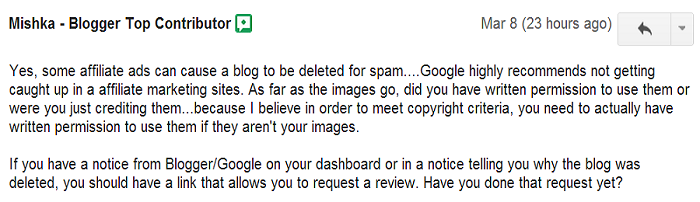
A person Donal Keegan asked a question in the Google Group that Does affiliate ads make the blog spam.
He told that his blog has been marked span.

The Reply he got from the Blogger's top Contributors are Surprising:-

They told that yes Some Affilates can cause a blog to be deleted as spam. Google Recommends not to caught in Affilate Marketting sites.


Then the Donal Keegan Posted his comment that he was not using any fraud affiliate ads

Also they told that "The Affilates which Google suits are AMAZON & GODADDY".


Conclusion:-
Use the Affilate Ads properly only after checking the reviews about the affiliates. 

Also READ:-

How to Protect blog Before Blogger Ban/Delete it? 

How to add Linkedin Share Button to your blogger Blog?


Adding sharing button always has been consider as one of the steps to Socialize your blog.
You might be familiar with the Facebook share button and might too have it on your blog.
Today I came to know about the Share button of a another social networking website which connects professionals-LinkedIn


Whats is LinkedIn?
LinkedIn is Social Networking Website for people in Professional Occupation. It has around 200 million Registered Users.

200 Million Users approximate 20 Crore users. A possibility to famous your blog among professionals.

How to Add Share Button to Your Blog?
1.First of all Copy the below code:-

<script src="//platform.linkedin.com/in.js" type="text/javascript"></script> <script type="IN/Share" data-counter="top"></script>

2.Go to Layout>Add Gadget>HTML/Java Script
3.Then copy this code here and save it.
4.Check Share Button on is your website.

Preview


Benefit of Adding this button:-
Enable users to share your website with LinkedIn's professional audience, and drive traffic back to your site.
 

About The Author


I am a B.Tech Computer Science Student. I love Programming and blogging. I am Oracle certified Java Professional. My Profile

DMCA.com

Technology Blogs

Education Blogs

Twitter Facebook RSS YouTube Google
​

All Rights Reserved ©Indian Blogger Community 2013

© 2013 Designed by Indian Blogger Community