New : Download Free:Ebook | FREE : [ Limited Copies ] Premium Blogger Template : Grab Now!!! | Like Us :

Showing posts with label Guest-Blogging. Show all posts

Sunday, 2 June 2013

Watermark : Protect Your Images | Free Watermark Softwares


This is the First Guest Post on Indian Blogger Community by Himanshu.

Today content copying/stealing has become a trend. Every day some unethical people are copying the Content of your website and damaging the traffic to your website. Just like content Theft, Image theft is also becoming more and more intensified. Some non-sense bloggers might be using your images without your prior permission.
Everyone wants to protect his or her images from being copied, misuse or being stolen. However we actually don't know to stop that.

The best way to stop your images from being stolen is to prove your ownership on your images.


Why and How to Prove Ownership on Your Images?
If someone is copying or misusing your images then the best solution is to complain against them. You can file a DMCA complain against them. Also you can also complain to Google against Copycats. But during the time of complaining they will ask for proves & to prove your ownership on images. The best way to prove your ownership on your images is to start adding WATERMARK logo.

Watermark is a kind of marker which is typically used to identify the ownership of images of your website.

Why Watermark is necessary?

  • It is will help you to protect your images from Copycats.
  • It will help you to file complain against the People who are using your images without prior information.
  • It will warn the Copycats not to use your images.
  • It is the best way to authenticate & declare the ownership of your images.


How to add Watermark?
You can easily add the Watermark logo to your images by using any Photo Editing Software like PhotoShop. Also you can add Batch Waterlogo using some of the below Free Softwares.


Free WaterMark Softwares Download Link
Alamoon Watermark Link 1
TSR Watermark Image software Link 2
WatermarkLib Link 3
uMark Lite Link 4
Kigo Image Converter Link 5


 Guest Author
Himanshu Rathee. He is the founder & CEO of technicalrevolution.in. He loves to write about Technology. He is currently Pursuing Btech(Mechanical).

Submit your website To Bing Webmasters


Today Google is undoubtedly Number 1 Search engine. All the Bloggers & Webmasters are only concerned about the indexing of their website on Google. They complete neglects the other Search Engine.

Google Claims 67% Search Market Share... Think also of rest Search engines 33%.

Today we are going to discuss How you Submit your website To Bing. Bing is also a popular search engine in USA & Europe. So indexing your urls on Bing may fetch some extra traffic to your Blog.
So neglecting Bing will be a follishness.

Just like Google Webmasters, there is also Bing Webmasters.

How to Submit your Website to Bing?

  1. First of all go to http://www.bing.com/webmaster/messages/home
  2. If you already have a bing account then login other wise Create a new account.
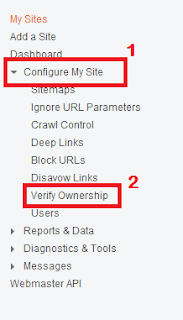
  3. After Successful Login a Control Panel will appear.
  4. On the Left hand side panel click "Configure My site" & then Verify Ownership.
  5. Enter the url of the website you wants to add.
  6. There are 3 option to verify the ownership of your website.

Option 1: Place an XML file on your web server
Option 2: Copy and paste a tag in your default webpage
Option 3: Add CNAME record to DNS


You can choose any method to verify the ownership of your website. After successful verification your website will be indexed on Bing Search engine soon.

Donot Neglect Bing Because

Bing claims 16.5 percent of Search Market Share.


 Guest Author
Himanshu Rathee. He is the founder & CEO of technicalrevolution.in. He loves to write about Technology. He is currently Pursuing Btech(Mechanical).

Saturday, 23 March 2013

Guest Blogging on Indian Blogger Community


HELLO FRIENDS

As you know, we have launched our blog Indian Blogger Community in January 2013. We have gained good support of our readers.
With in just 3 months of hardwork we have attained a Good Alexa ranking.

Our Current Alexa Ranking & Page Rank

Alexa Traffic Rank: 178,271   Traffic Rank in IN: 12,906
Page Rank is :-1

With in the 20 days of its launch Google rewarded us with page rank 1 in Google Page Rank Feb 2013 Update. We are getting good traffic. Although we have not yet monetized it yet. Today blogging has emerged as one of the hottest online Hobby as well as mean to earn money.

Guest Blogging

Our many loyal readers and some bloggers are continuously asking us for starting Guest Blogging on Indian Blogger Community. So we are going to start to Guest Blogging on our Blog from 26 March 2013 i.e.
The Day of HOLI.


Why you should guest post on Indian Blogger Community?

1. Indian Blogger Community Respect every blogger and will give full credit to your work.
2.Secondly on every guest post you submit, you will be allowed to place one 468*60 ads(Only Google Ads). This means you will be able to earn through Google Ad-sense by posting Guest Article on our Blog.
3.Thirdly We will  reward you with Cash Amount for every guest article you submitted. It means you need not to depend on Google Ad-sense for getting reward for your article.

Reward Amount
1-3 Articles Daily=Rs 10 per Article.
3+ Articles Daily=Rs 20 per Article.


Guidelines for Guest Articles:-

1.Article Quality:- The minimum length of article must be of 250 words. The Article should be complete not incomplete. The Article should be informative.
2.Article should never be published any where before.
3.Article should not be copied from any where. Copied Articles will be straight forward rejected & you will be banned for ever.
4.Images speaks thousand words so images should be there in post but you are not allowed to add copyright protected images.
5.You have to reply to the comments asked by the peoples on your guest post article.
6.The Guest Article Should be from Following Niche:-

Wordpress Money Making Templates SEO Interviews
Blogger Widgets & Plugins Info Graphics Entrepreneurs Alexa
Joomla Facebook Softwares Page Rank Web Hosting
Widgets Twitter Internet Any other relevant topic

Terms & conditions


  • Only Indian Bloggers can Participate in Guest Blogging.(For Now)
  • The minimum Cash out will be Rs 100 and will be paid through Net Banking.
  • The Articles will be published within 7 days of submission if accepted.
  • Acceptance or rejection will be based on quality of the article
  • If we discover you are copying articles from some where you will be disqualified from Guest Blogging.


All those who are interested in submitting can submit their Article on ashish17121992@gmail.com
For any doubts and query please mail me at ashish17121992@gmail.com or Comment below
 

About The Author


I am a B.Tech Computer Science Student. I love Programming and blogging. I am Oracle certified Java Professional. My Profile

DMCA.com

Technology Blogs

Education Blogs

Twitter Facebook RSS YouTube Google

All Rights Reserved ©Indian Blogger Community 2013

© 2013 Designed by Indian Blogger Community